Android Pie icons introduced a fresh layer of visual consistency, system-wide alignment, and enhanced usability across devices. More than just an aesthetic update, these icons reshaped how users interact with Android interfaces while offering designers new standards to follow.
This article explores the principles behind android pie icons, their integration into the system, the impact on third-party adaptation, and why they remain an important milestone in Android’s design journey.
Content
Visual Consistency in Android Pie Icons
One of the defining aspects of android pie icons is their focus on delivering a seamless and cohesive design system.
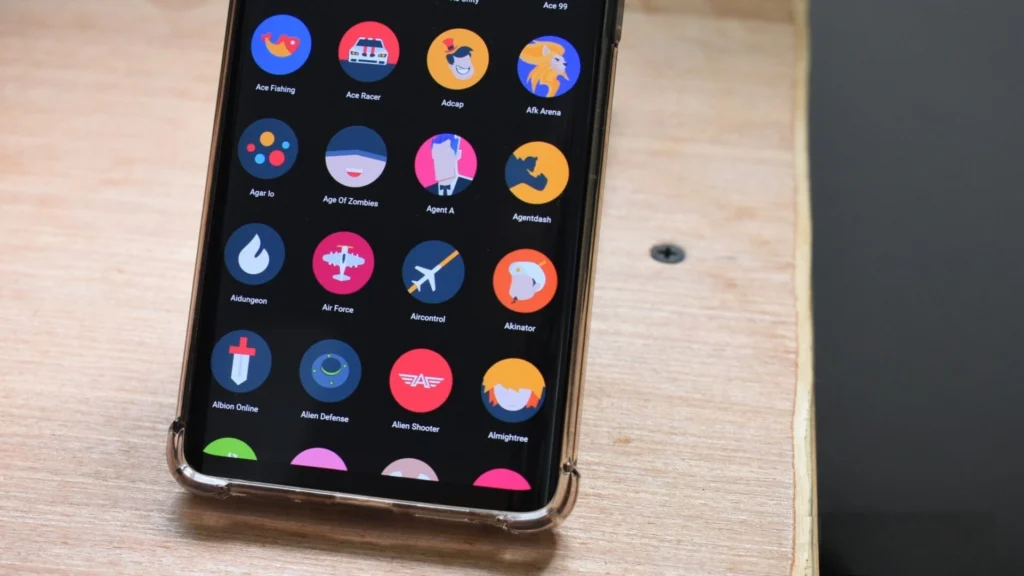
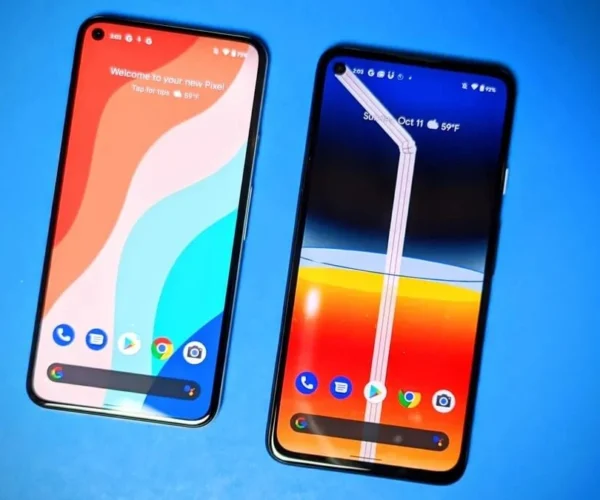
Uniform Shape Language Before Android Pie, icons often looked mismatched — some were circular, others were square, and many had irregular outlines. Adaptive icons solved this by standardizing shape masks, so whether an app icon was circular, square, or teardrop-shaped, it fit perfectly into the system grid.
Standardized Color Palette Android Pie adopted a brighter, flatter color scheme. By removing unnecessary gradients and shadows, icons became more legible across different backgrounds and display types.
Iconography Alignment Common metaphors such as the cogwheel for settings, the phone handset for calls, and the envelope for email were refined for clarity and uniformity.
Together, these elements reduce cognitive load, allowing users to recognize apps quickly and intuitively.
System Integration and Design Harmony
Beyond the surface, android pie icons were designed to function harmoniously within the Android ecosystem.
Harmonized Visual Language Icons align with system animations, notification badges, and quick settings. This creates a consistent visual rhythm that enhances usability.
Consistent API Usage Developers were encouraged to adopt adaptive icon APIs introduced in Android Oreo and refined in Pie. This ensured that third-party apps blended seamlessly with system apps in launchers, app drawers, and notification panels.
Accessibility Enhancements Icons in Android Pie scale smoothly without pixelation, ensuring clarity for users with vision impairments.
By embedding these design rules into system-level components, Android Pie created a smoother interface across devices.
Third-Party Adaptation of Android Pie Icons
Another strength of Android Pie was its ability to influence third-party app design. Developers were encouraged to adapt their apps to the updated standards, ensuring a cohesive user journey across native and external applications.
Many developers embraced adaptive icons to keep their apps visually aligned with Android defaults.
Popular launchers such as Nova Launcher and Lawn chair quickly adopted Pie’s adaptive framework.
Icon packs and customization tools emerged, enabling users to personalize while maintaining overall system consistency.
This adaptability reinforced the idea that Android’s design language is both standardized and flexible.
The Role of Android Pie Icons in Material Design
Google’s Material Design philosophy emphasizes clarity, hierarchy, and simplicity. Android Pie icons aligned closely with these principles:
Simplicity: Minimal use of shadows and gradients allowed for faster recognition.
Hierarchy: Uniform shapes ensured that no single icon overpowered the others visually.
Consistency: Following a shared design grid guaranteed that every icon contributed to a balanced system UI.
This alignment with Material Design made Android Pie’s visual language feel timeless and adaptable to future Android versions.
Optimizing the Visual Experience with Android Pie Icons
While the default design already enhances usability, users and developers can take further steps:
Tip 1: Choose adaptive icon packs These maintain Android Pie’s consistent shape language while offering creative customization.
Tip 2: Prioritize contrast and clarity Developers should ensure their icons remain clear against various wallpapers and themes.
Tip 3: Use icon masking effectively App designers should implement adaptive masks so their icons adapt automatically to circles, squares, or rounded shapes without distortion.
Final Thoughts
The introduction of android pie icons marked a turning point in Android’s visual language. By emphasizing consistency, integration, and accessibility, Google created a framework that not only enhanced user experience but also set standards for developers and designers.
Even today, Android Pie’s design rules continue to influence newer Android versions. Whether through native layouts or custom icon packs, the legacy of Android Pie icons proves that thoughtful visual design can dramatically improve usability.
Android Pie introduced a fresh, colorful approach to app icons, improving usability and aesthetics. Designers now explore adaptive shapes and animations to enhance user experience. Businesses looking to promote their apps can easily advertise with us for maximum reach.
FAQs
What makes Android Pie icons different from previous versions?
They introduced adaptive icons with consistent shapes, improved scalability, and a more cohesive design language.
Can users customize Android Pie icons?
Yes, through third-party launchers and icon packs, while still maintaining baseline system consistency.
I’m Kelly Hood! I blog about tech, how to use it, and what you should know. I love spending time with my family and sharing stories of the day with them.
I'm Kelly Hood! I blog about tech, how to use it, and what you should know. I love spending time with my family and sharing stories of the day with them.
The best Android tablet market is brimming with innovation, offering devices that cater to professionals, gamers, students, and casual users alike. Whether you’re seeking a powerhouse for…
Are you looking for a way to run a rooted Android emulator on your Windows PC? Prerooted Android emulators for Windows allow users to gain full access…
Looking to unlock premium features and enhance your Android experience? The best way is through Quest Mod APKs, offering access to premium content, ad-free experiences, and advanced…
The Samsung Galaxy Note 10.1, while once a flagship device, is no longer supported with official updates. However, with the installation of a custom ROM like LineageOS…
Selecting the best earbuds for Android is crucial for maximizing your music, calls, and media experience on your device. The best earbuds for Android should offer a…
If you’re searching for the best apps to watch Vietnamese TV on Android, this guide will cover everything you need. Several outstanding applications cater to various content…